

How a voice agent works
A voice agent is a NappAI flow that answers calls. The caller speaks, the agent listens, thinks with a language model, uses the tools you gave it and answers out loud. People can call it from the browser (with a widget on your website or from your own application) and from a phone. The agent can also be the one who calls.
In this video you see both kinds of voice agent with the same example: the flow, its configuration, a real call from the playground with each one, publishing, the history with the recording, and the rules the agent never breaks (Guardrails).
To see what sets NappAI voice agents apart from other voice platforms and how much you save with them, start with Why NappAI for voice agents.
This section is the step-by-step guide, with screenshots of every screen:
| Step | Page |
|---|---|
| 1. Build the agent’s flow | Create a voice agent |
| 2. Talk to it while you build it | Test in the playground |
| 3. Publish it and choose the channels | The Voice Agent menu and publishing |
| 4. Give it a face | The avatar |
| 5. Put it on a website | Web widget and browser calls |
| 6. Connect a phone number | Phone: inbound calls |
| 7. Have it place calls | Outbound calls |
| 8. Hand the call over | Transfers and hanging up |
| 9. Review what happened | History, transcripts and recordings |
| 10. Fine-tune it | Quality, noise and latency and Troubleshooting |
Two kinds of agent
NappAI has two components to build a voice agent. Both use the same tools, are tried in the playground, are published from the Voice Agent menu and keep their calls in the history in the same way. What changes is how they hear and speak.
| Voice Agent | Voice Agent Realtime | |
|---|---|---|
| How it works | Three pieces: an ear (STT) that turns what the caller says into text, a model that thinks, and a voice (TTS) that speaks the answer. | A single realtime model hears the caller, thinks and answers in its own voice. |
| Cost | The most economical: you pick each piece to keep costs down and get a professional result for very little per conversation. With local ear and voice, which run inside NappAI, you only pay for the model. | More expensive per minute of call. |
| Speed | Highly optimized: it answers very quickly. | Even faster: a voice-to-voice model hears and answers without going through text. |
| What you choose | Each piece separately and from any provider: the model, the ear’s language and the voice. | The model (OpenAI Realtime, Gemini Live or Grok Voice), one of its voices and the accent. |
| Best for | Handling many calls at the lowest cost and controlling every detail of the ear and the voice. | The most natural conversation possible, with less to tune. |
If you are not sure which one to pick, start with the Voice Agent: it is the most economical and the one you can tune the most. You can try both with the same prompt and the same tools, and even pass a call from one to the other with Transfer Call.
The pieces
This section explains the Voice Agent. The Voice Agent Realtime works the same way, but instead of Model, STT and TTS it has a single connector, Realtime model; its fields are on its page.
Every voice agent is a flow with a Voice Agent component and, connected below it, the components that give it each ability:
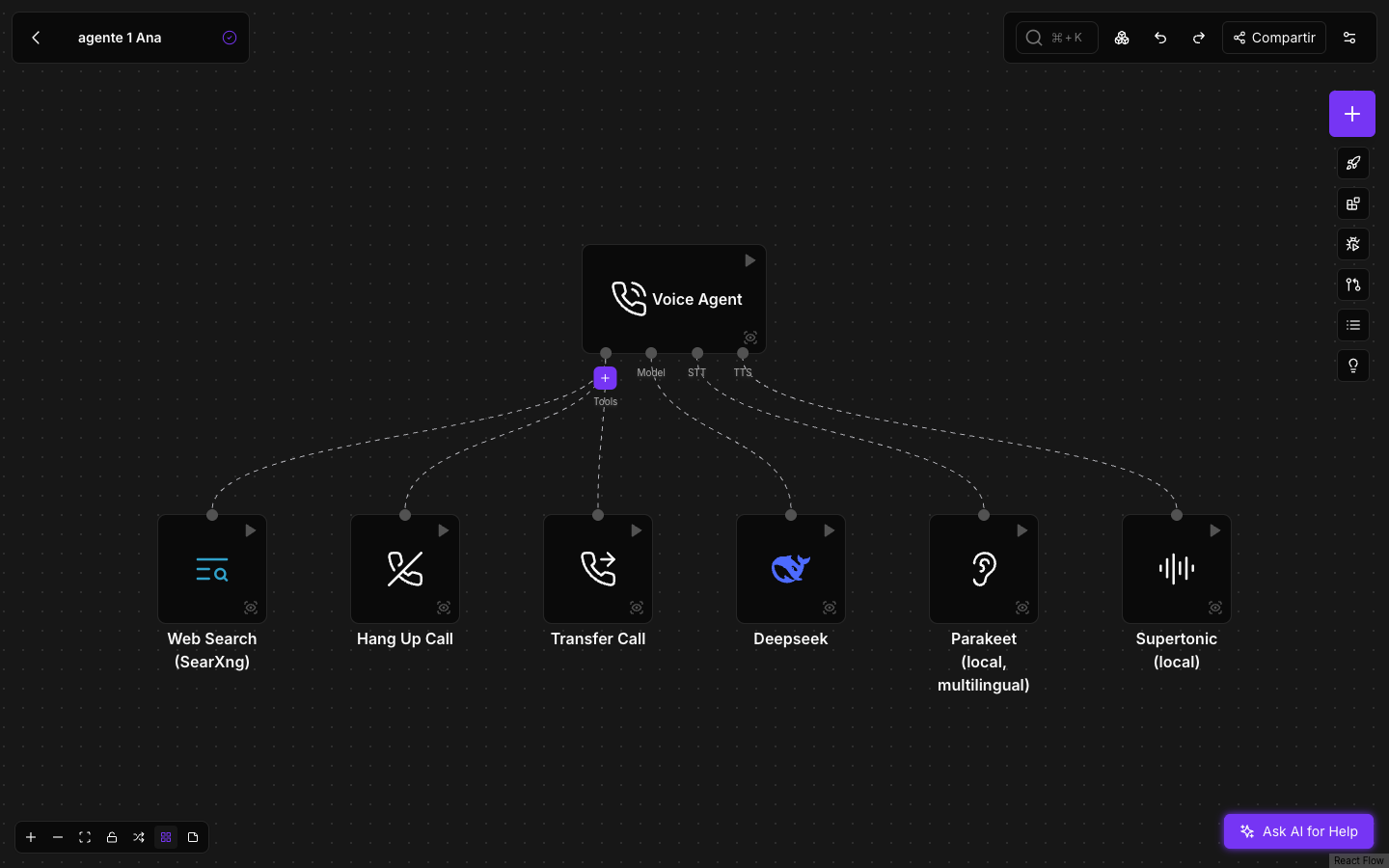
| Connector | What it adds | Examples |
|---|---|---|
| Model (required) | The brain: it leads the conversation and decides when to use a tool. | DeepSeek, Groq, OpenAI, Gemini, Inworld, Ollama |
| STT (required) | The ear: it turns the caller’s voice into text. | Parakeet (local, multilingual), Vosk (local), Groq Whisper STT, Deepgram STT, Azure Speech STT… |
| TTS (required) | The voice: it turns the answer into audio. | Supertonic (local), Pocket TTS (local), Piper (local), Kokoro (local), ElevenLabs TTS, Cartesia TTS… |
| Tools | What the agent can do during the call. | Any component in tool mode, a sub-agent or an MCP and, on top of that, the call tools of the Voice Agent family: Transfer Call, Hang Up Call and Say to Caller |
STT and TTS components only fit their own connector. They hold each engine’s settings (language, voice, credential) and the agent uses them when it answers each call.
What happens in a call
Every turn of the conversation follows the same cycle:
- Listen. The agent detects when the caller is speaking and when they have finished, and the STT transcribes what they said. With Ignore Other Voices on, what another person says in the background neither interrupts the agent nor gets an answer.
- Think. The model receives your system prompt, the conversation so far and the call context (date, time, number).
- Act. If needed, it uses one of the flow’s tools with the credentials of the flow’s owner. With Guardrails on, the action is first checked against your rules; if it breaks one, it is not taken and the agent explains it to the caller. While the tool works, the agent may say a waiting phrase and a keyboard sound plays in the background, so the caller is not left in silence.
- Speak. The TTS starts with the first sentence of the answer without waiting for the rest. If the caller interrupts, the agent stops talking and listens.
Each call is one execution of the flow. Every tool the agent uses is recorded in that execution and in the call history.
How the agent knows when you speak and when you have finished
To answer quickly without cutting anyone off, the agent combines several layers that work at the same time throughout the call:
- Voice detection. A model tells human voice from other sounds, such as a car horn, a bang or a keyboard. Speech Sensitivity and Minimum Speech Duration (S) tune it.
- A clean copy of the audio, with AI. With Noise Reduction, a second model also listens to a copy of the audio in which the caller’s near voice is separated from background chatter. That way the turn ends on time even from a bar or a cafeteria. In a quiet conversation it decides exactly as without it and adds no wait.
- Recognising the caller. With Ignore Other Voices, the agent learns the caller’s voice and is neither interrupted by nor answers other people nearby or a TV.
- Double end-of-turn detector. When the caller goes quiet, a model decides from the sound of their last words whether they have finished or are only pausing. If it is unsure, a second model listens to the intonation and rhythm of the last seconds and, if it is sure they have finished, the agent answers right then instead of waiting longer. So it doesn’t cut off someone dictating a number, nor keep waiting someone who has finished. End-of-turn Confidence, Longest Wait For End Of Turn (S) and Second end-of-turn check tune it.
- An answer prepared in advance. While it decides whether the turn has ended, the agent already prepares the answer, and starts speaking with the first part of the sentence without waiting for the whole of it.
- Interruptions. If the caller speaks while the agent answers, the agent stops once the interruption lasts at least Minimum Duration To Interrupt (S) and has Minimum Words To Interrupt words. If it was a false alarm, it resumes its sentence (Resume After False Interruption (S)).
All these layers come on and tuned by default for phone lines and noisy places.
Draft and published version
A voice agent lives in two versions:
- The draft is the flow as it is on the canvas. The playground uses it, so you can test every change right away, without publishing and without a phone number.
- The published version is the flow’s deployed version. It answers every real call: widget, API, phone and outbound. It also receives transfers from another agent, even when the transfer starts from a playground test.
If you change the flow after publishing it, real calls keep using what is published. To have them use the new version, deploy a new version of the flow and click Update publication. See Versions and publishing.
Every call runs on the flow owner’s account: their credentials, their environments and their usage.