

Error handling (On Error)
Any component can fail: a service that does not answer, an expired key, data that never arrives. By default, when a component fails, the flow stops and the run ends with an error. With the On Error tab you decide what happens in each component.
This is how you set it up and what you see when a component fails:
Where it is
Open a component’s settings and click the On Error tab. Almost every component has it. The ones that start or end a flow (Chat Input, Chat Output, Webhook), the ones that choose the path (Conditional Router, Switch, Loop) and the voice components, which have their own rules during a call, do not.
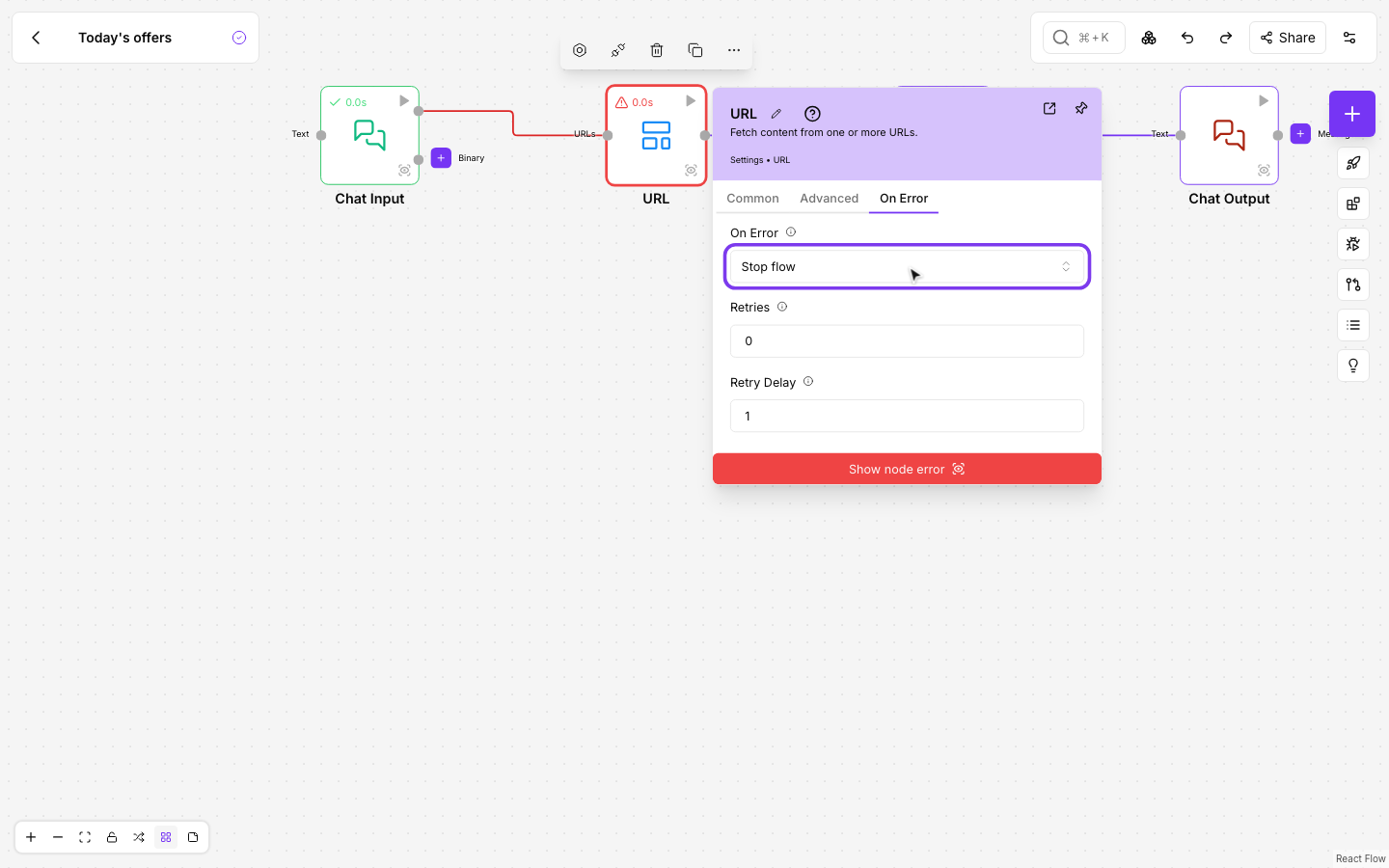
What you can choose
In On Error you choose what happens when the component fails:
- Stop flow: the flow stops and the run ends with the error. This is what always happens if you change nothing.
- Route to Error output: the component shows a new output, Error, in red. If it fails, the flow continues through whatever you connected to that output, and not through the normal outputs. If it works, the Error branch does not run.
- Continue with default value: if it fails, the component returns what you write in Default Value and the flow carries on as usual. You can write text or JSON.
With Route to Error output, the Error output gives you:
| Field | What it holds |
|---|---|
error | The error message, without keys or passwords |
text | The same message, for components that read the text (Parse Data with {text}, Chat Output) |
error_type | The kind of error |
component | The name of the component that failed |
component_id | Its id in the flow |
attempts | How many times it was tried |
If you choose Route to Error output but connect nothing to Error, the flow stops just like with Stop flow: nobody picks up the error.
When a component counts as failed
On Error acts when the component fails. Some components do not fail when the service answers with an error: they give you the answer with the error inside, so you decide later in the flow.
- API Request: with On Error at Stop flow, an error from the service (a 500 code, for example) arrives as data, with its
status_code, as always. As soon as you choose another option or set Retries, an answer with a code of 400 or more, or a request that never reaches the service, counts as a failure. - If a component gives you the error as data and you want to handle it, check that data with a Conditional Router after the component.
Retries
- Retries: how many more times the component is tried before it is given up as failed, from 0 to 5.
- Retry Delay: the seconds it waits before the first retry. Each retry waits twice as long as the one before.
A retry runs the whole component again. So that nothing that was already done is done twice (an email, a payment, a record), a failure is only retried when it shows that nothing was done:
- The service could not be reached: it does not exist, does not answer or refuses the connection.
- The service answered that it was busy and did not handle the request (errors 429 and 503).
Any other failure is not retried, even if you set Retries: a service that takes too long to answer, a 500 error or wrong data. In those cases the request may have been processed, so the component goes straight to what you chose in On Error.
A component that receives a list and handles it all at once, such as several addresses or several emails, is not retried either: if it failed on the third one, a retry would process the first two again. To retry record by record, turn on Batch Mode: each item runs on its own and only the one that fails is retried. The panel warns you under Retries when the component can use Batch Mode and does not have it on.
Retries work with all three options. With Stop flow and retries, the component is tried several times and, if it keeps failing, the flow stops.
What a handled failure looks like
When a component fails and On Error handles it, its status icon turns amber instead of green. Hover over it to see the error and how many times it was tried.
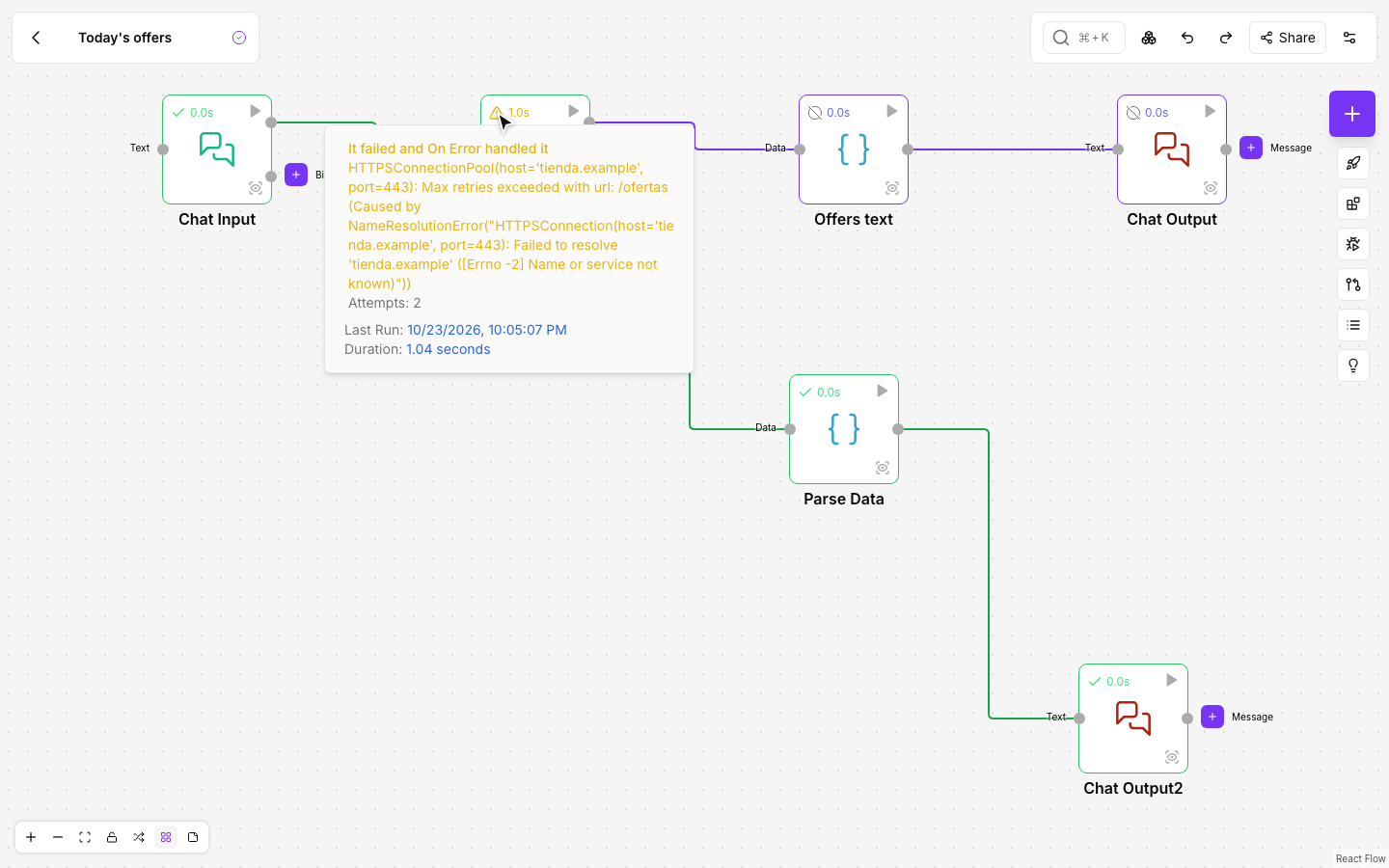
The run ends well, but the error stays in the run’s log, in Runs, as Handled error.
With Batch Mode
With Batch Mode, On Error applies to each item on its own:
- With Route to Error output, the items that fail go out through Error and the ones that work, through the normal output. One broken item no longer stops the whole list.
- With Continue with default value, each item that fails returns the default value.
- Retries are done item by item: the items that already worked are not repeated.
Inside a Loop
With Route to Error output inside a Loop, both branches (the normal one and Error) must meet again before the Loop End, which takes a single connection. Join them with a Merge Data and connect its output to the Loop End: the item that fails goes through the error branch and the loop carries on with the next one.
With Continue with default value nothing else is needed: the item that fails returns the default value and the loop carries on.
When the component is an agent’s tool
If you connect the component as a tool of an agent:
- Retries and the default value work the same.
- With Route to Error output, the agent receives the error as the tool’s answer and decides what to do: try something else, ask the user for some data or explain what happened.
Examples
- An external service that is sometimes overloaded: Retries at 2 and Retry Delay at 2 seconds.
- Data you can do without: Continue with default value with a text like “No information”.
- Getting told when something fails: Route to Error output and connect Error to a component that sends an email or a message to your team.