

Approvals
Approvals brings together the agents that have stopped to wait for someone to approve or reject what they are about to do. From here you answer and the agent carries on exactly where it stopped, even if the wait lasted days.
Waits show up when an agent in a published flow uses Request Approval or the tool approval of the Agent’s Human-in-the-Loop.
This is how an approval is requested and answered, from this inbox or from another system:
Open the inbox
In the sidebar, under Monitoring, click Approvals. The screen has two tabs:
- Pending: what is waiting for an answer right now.
- History: all waits, answered or not.
The Refresh button reloads the list. It also refreshes by itself every 30 seconds.
If there is nothing to answer, you see Nothing pending.
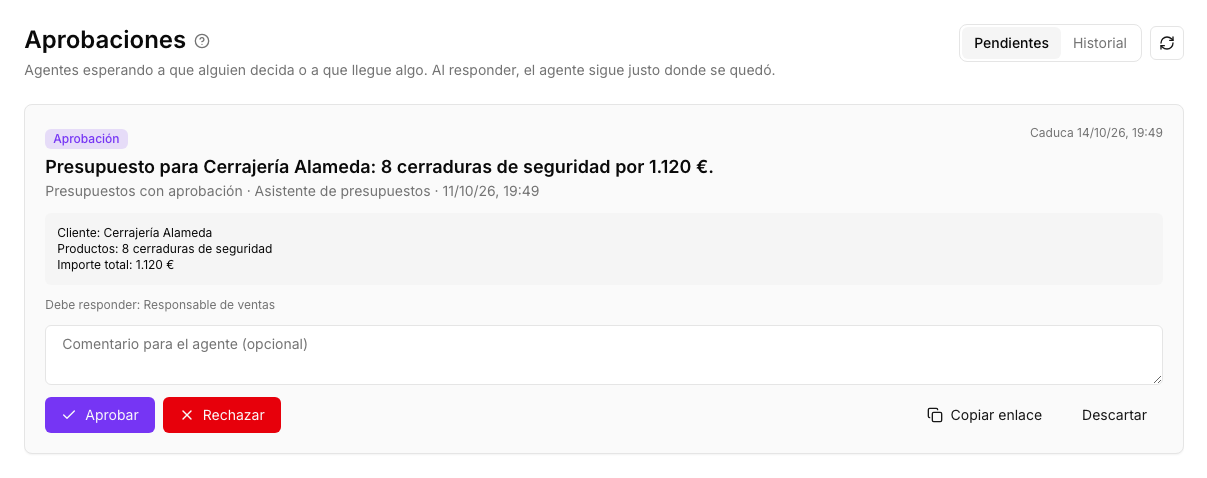
What each request shows
Each pending request appears in a card with:
- A label with its kind: Approval or Tool approval.
- The title, the name of the flow and the agent, and the date.
- When it expires, for example Expires followed by the date.
- The question and the details the agent wrote: the draft, the figures or its reasons.
- To be answered by: the person set in Who Approves, if it was filled in.
- For tool approvals, the tool the agent wants to use and the data it would use it with.
Answer
- If you want, write a comment in Comment for the agent (optional). The agent receives it with your decision.
- Click the matching button:
| Button | What it does |
|---|---|
| Approve | Approves the action and the agent carries it out. |
| Approve with changes | Only for tool approvals that allow editing. Turn on Edit the arguments before approving, change the data the tool will be used with and approve. |
| Reject | The agent does not carry out the action and tells the user. |
| Dismiss | Closes the wait without answering. The agent stays stopped. |
| Copy link | Copies the request’s private link, to send it to whoever must decide. See Other ways to answer. |
After answering you see Answer sent: the agent carries on and the card leaves the list. The agent keeps working on its own; its answer later appears in History. In the executions log the continuation belongs to the same execution that stopped, with the same ID, so you can follow from start to end what happened before and after the answer.
Each request is answered only once. If someone has already answered it, for example from a link or from another system, NappAI tells you it has already been answered.
Other ways to answer
The inbox is not the only way. The same request can also be answered:
- With its links. Each Request Approval request has a link to approve and another to reject, which are also webhooks; tool approvals have their link, which you copy with Copy link. The agent can send them by email, Slack or Teams, or give them to an external service, such as an e-signature or payment service. Any person or system that has them can answer without signing in to NappAI: a person, by opening the link in a browser and confirming; a system or another flow, with a POST request to one of the two links, which can carry a comment and data. See Request Approval.
- In the conversation, if the user is still talking to the agent.
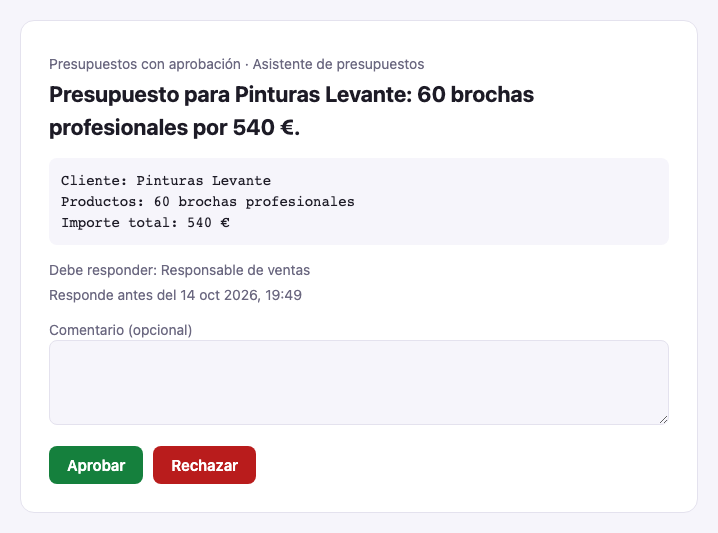
This is what a request’s page looks like in a browser: the title, the details, who should answer, the deadline, a comment box and the buttons to answer. Whoever opens the approve link or the reject link sees only the button for that decision, to confirm it.
The history
The History tab shows all waits in a table:
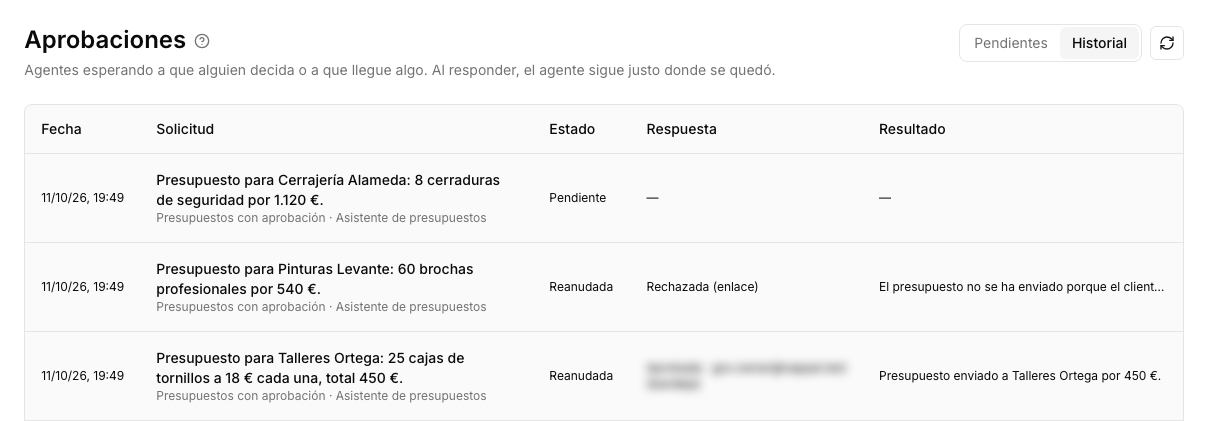
| Column | What it shows |
|---|---|
| Date | When the agent stopped. |
| Request | The title of the request. |
| Status | Where it stands (see below). |
| Answer | The decision, who took it and where: inbox, link (also when another system answers with a POST request to the link), chat, or deadline if it was answered automatically when it expired. |
| Result | The agent’s answer after carrying on. |
| Status | What it means |
|---|---|
| Pending | Waiting for an answer. |
| Resuming | It has been answered and the agent is working. |
| Resumed | The agent has finished working after the answer. |
| Expired | The deadline passed without an answer and it was left to expire. The agent stayed stopped. |
| Dismissed | Someone closed it with Dismiss. |
| Failed | It was answered, but the flow could not continue. |
| Superseded | The same agent, in the same conversation, made a new request that replaces this one. |
Deadlines
Each wait has a deadline, set in the component that created it: Deadline (hours) and If Nobody Answers in Request Approval, Approval Deadline (hours) and If Nobody Answers in the Agent. When it passes without an answer, NappAI applies what that component says: reject or approve, and the agent carries on. If the component says to leave it expired, the wait becomes Expired and the agent stays stopped.
Who sees each request
Each person sees the waits of their own flows. Team members see the account’s waits according to their role. See Roles and permissions.