

Quality, noise and latency
Local engines or other providers
Each STT (the ear) and each TTS (the voice) is either local or from another provider:
- Local: it works inside NappAI. It needs no credential, the audio does not leave NappAI and there is no per-minute cost.
- From another provider: an outside service you connect with its credential. It offers more languages and voices, with a usage cost according to your contract with that provider.
| Local | From another provider | |
|---|---|---|
| Hear (STT) | Parakeet (local, multilingual), recommended; Vosk (local), Spanish and English only and less accurate, etc. | Groq Whisper, Deepgram, Azure Speech, OpenAI, Gemini, ElevenLabs, Cartesia, Gladia, Inworld, AssemblyAI, Wit.ai, etc. |
| Speak (TTS) | Supertonic (local), recommended; Pocket TTS (local), the quickest to start speaking, Spanish only; Piper (local); Kokoro (local), etc. | ElevenLabs, Cartesia, Deepgram, Azure Speech, OpenAI, Gemini, Inworld, etc. |
The recommended combination is Parakeet + Supertonic. If you also use a local model, such as Ollama, the whole agent runs inside your installation.
Parakeet understands Spanish and English very well. With Detect Language on, it follows the caller if they switch language. For Catalan, Galician or Basque, use an STT from another provider, such as Azure Speech.
Choose an engine from another provider when you need a language the local ones do not cover, a brand voice or the highest naturalness.
With Fallback Engines on in the Voice Agent component you can connect a second model, STT and TTS. They take over if the main one fails in the middle of a call.
Noisy environments and background voices
On the street, in a car, in an office or with the TV on, the agent may hear things that are not the caller. The Voice Agent component has several defenses under Advanced → VAD and Audio. The defaults are already the recommended ones for phone and noise.
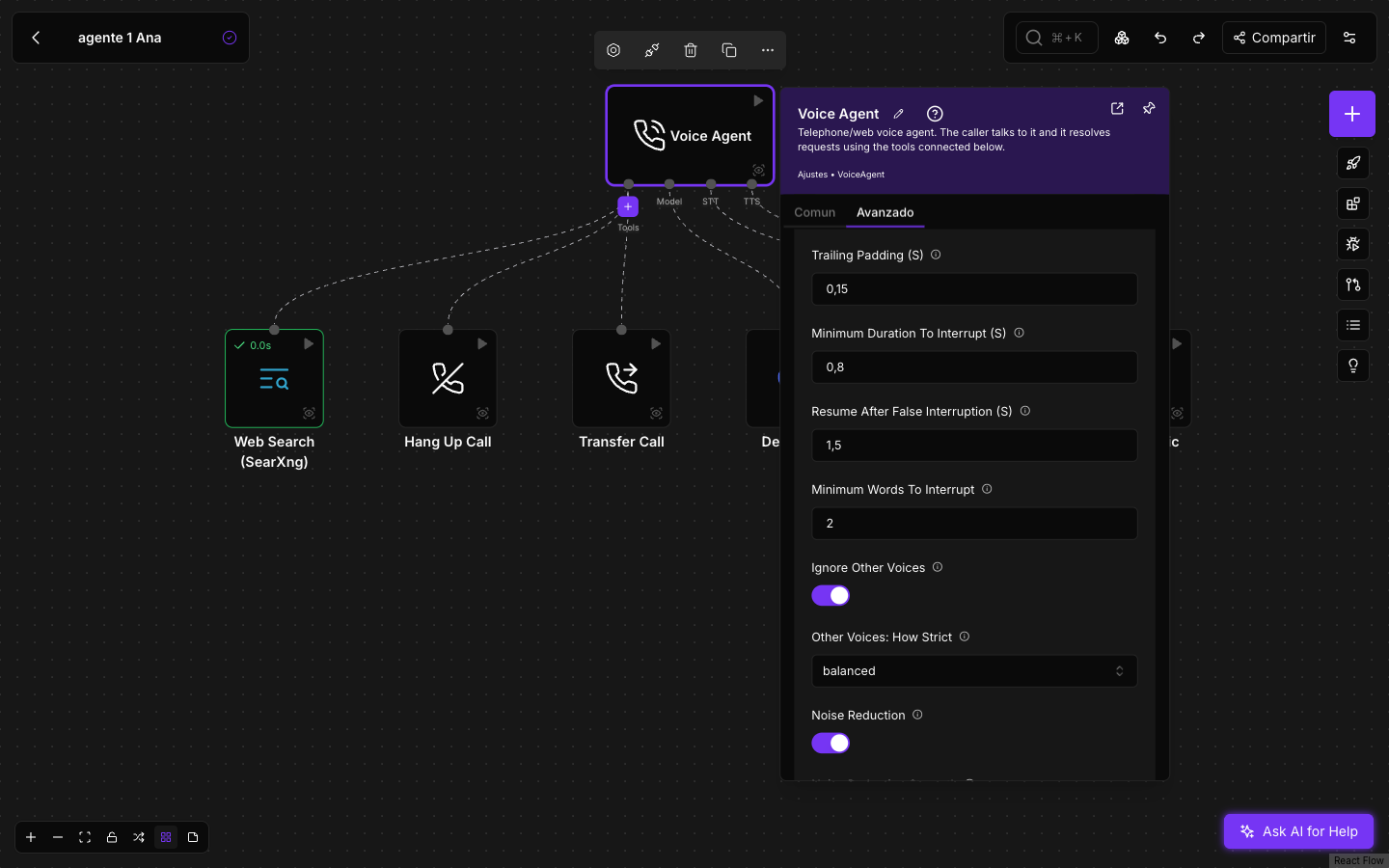
| Setting | Default | What it does |
|---|---|---|
| Noise Reduction | On | Cleans up background noise before deciding whether the caller is speaking. |
| Ignore Other Voices | On | Learns the caller’s voice: it is the one that answers the agent. A voice that is not theirs (someone behind them, a TV) does not cut the agent off and, once the caller is recognized, does not get an answer either. It works with any STT and adds no wait. |
| Other Voices: How Strict | balanced | gentle ignores only clearly different voices; balanced is the recommended point; strict ignores more background voices, at the cost of the caller sometimes having to repeat a very short word. |
| Minimum Duration To Interrupt (S) | 0.8 | How many seconds the caller must speak to cut the agent off. A car horn or a single word does not interrupt it. |
| Minimum Words To Interrupt | 2 | Words needed to cut the agent off, with STTs that transcribe while the person speaks, such as Vosk, Deepgram or Azure. |
| Speech Sensitivity | 0.7 | Raise it slightly, for example to 0.75, if noise is taken for speech. |
The agent recognizes the caller in the first seconds of the conversation and, if at first it mistook another voice for theirs (for example, a radio that was playing before), it corrects itself as soon as the caller answers.
If the caller and another voice speak at the same time, with no pause in between, the agent receives the sentence mixed.
If the agent answers a TV or someone in the background, try Other Voices: How Strict on strict. If it ever ignores the caller themselves, go back to balanced or gentle.
Automatic audio cleanup
On top of these settings, NappAI cleans the audio of every call with nothing for you to configure:
- From the browser (the widget on your website and the playground), background noise and echo are removed on the caller’s own device, before the voice leaves for the agent, and the microphone volume adjusts itself. On devices that support it, the voice is also isolated from other sounds.
- By phone, line noise is reduced before transcription whenever that improves what the agent understands. It applies only to what is transcribed: recognising the caller’s voice and detecting when they speak keep working on the original audio, so the caller is not mistaken for someone else. It adds no wait to the answer.
- With people talking in the background (a bar, a cafeteria, an open-plan office), an AI model that runs inside NappAI tells the caller’s near voice from the chatter. The agent knows when they have finished speaking and answers on time, instead of waiting for the room to go quiet. When the caller stops in a quiet place, the turn ends as fast as without the model. Noise Reduction controls it.
- With the providers that offer it, their own noise reduction is also switched on before their model hears the caller.
How the agent detects when the caller speaks and when they have finished, layer by layer, is explained in How a voice agent works.
Call ambience
Complete silence on the other end sounds like a dropped call. That is why, by default, the agent plays a very soft office ambience throughout the call and a keyboard sound while a tool is working. You adjust it in the Call Ambience group of the Common tab.
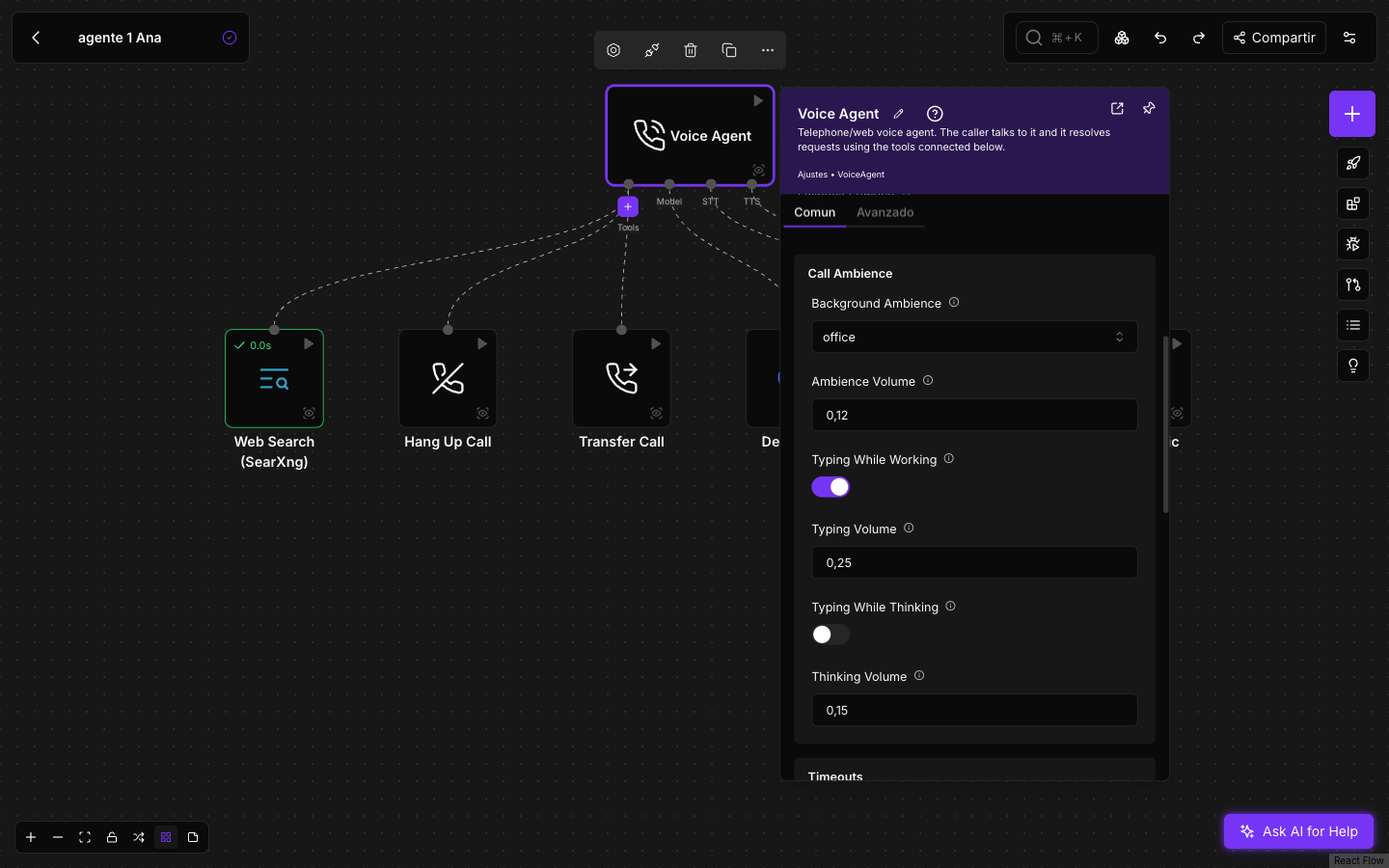
- Background Ambience:
officeby default; alsocity,forest,crowded_room, or empty for silence. Ambience Volume: 0.12. - Typing While Working: on by default, with Typing Volume 0.25. It only plays while a tool is working.
- Typing While Thinking: off by default. A soft keyboard while the agent prepares each answer, with its own Thinking Volume.
For a silent line, leave the ambience empty and turn off the keyboard.
Latency
Latency is the wait the caller notices: from when they stop speaking until they hear the agent. It appears under each answer in the call details.
It has three parts:
- End of turn and transcription. The agent waits for a short silence to know the caller has finished and transcribes what they said.
- The model. It is the part that weighs the most and varies the most between providers and models.
- The first spoken sentence. The TTS starts with the first sentence without waiting for the rest of the answer.
What to do, in order of impact:
- Choose a fast model. On models that reason, keep reasoning low or off: a call needs quick answers, not a report.
- Short, clear prompt. The model reads it on every turn. Avoid prompts several pages long.
- Short answers. Ask in the prompt for brief sentences: the first sentence plays sooner and the caller can interrupt.
- Supertonic Quality on
4 steps — Fastif the first sentence is slow: it comes out sooner, at the cost of a little naturalness. - Pocket TTS if you need it to start speaking even sooner. It only speaks Spanish.
- Fast tools. While a tool is working the agent covers the wait, but the caller notices a long one. Limit search results and avoid chaining slow tools.
- Do not shorten the end of turn to gain speed. Silence For End Of Turn (S) is set so as not to cut people off in noisy places. Below it, the agent answers before the caller has finished.