

What the assistant can do
The assistant can do almost everything you do in the dashboard. This page groups it by area, with an example of how to ask. For how it handles each request (plan, questions, tests and permissions), see How it works.
It always works with your identity and your role: whatever your role doesn’t allow you, it doesn’t allow the assistant either. And before changing anything in your account it shows you the exact change and asks for permission. See It shows you the change before making it.
Flows and canvas
| What | Ask it, for example… |
|---|---|
| Create, change, test and fix flows | ”Build a flow that classifies reviews and suggests a reply” |
| Import a flow exported from NappAI | Attach the .json you downloaded with Options → Export and ask “Import it into the Customers folder”. It can import up to 10 at once. If it comes from another account, the credentials arrive empty and it tells you which components need yours. |
| Migrate from n8n, Make or Zapier | See Migrate from n8n, Make or Zapier. |
| Change a flow’s name or description | ”Set this flow’s description to: replies to Google reviews” |
| Archive and unarchive flows | ”Archive the summer campaign flows” |
| Freeze or minimize a component | ”Freeze the component that downloads the catalog so it isn’t downloaded again on every test” |
| Save a component as your own component | ”Save this agent as a component called Review classifier”. If you already have one with that name, it tells you and, if you say yes, replaces it. |
| Update outdated components | ”Update the outdated components in this flow”. It keeps the values of the fields that still exist and tells you which values are lost and which connections point to something that no longer exists. |
| Notes on the canvas | ”Leave a note next to the agent explaining why it uses that model”. See Canvas notes. |
| What to do when a step fails | ”If the API doesn’t answer, retry three times and, if it still fails, send a warning on Telegram”. It sets this up with the component’s On Error tab: retries, a default value or a separate branch for errors. See Error handling. |
| An agent that answers from your documents | ”Build an agent that answers from our manuals”. It chooses the search techniques, checks that they beat the basic search and, if your data has relationships (customers, machines, technicians), it can build it with a graph in Neo4j. See RAG. |
| Use an MCP server from the catalog | ”Find names for a coffee shop and check whether the .com is free”. If there is no component for what you ask, it looks at the servers in the MCPs category before writing code, and adds one with its credential and its tool. See Use MCP servers. |
| Document a flow for your client | ”Document this flow so I can send it to the client”. See Examples. |
Canvas notes
When the assistant builds a flow, it leaves a summary note above it: what you asked for (the requirements, with whatever was settled in the conversation), how the flow is built to meet them, and what is still pending. Every time you ask for a change, it rewrites the note so it says what holds now, not a history of changes. If you’d rather it didn’t leave notes, tell it.
It can also add standalone notes next to a component or around a group, in the color you ask for. Whatever you moved by hand on the canvas stays where you put it.
Publish and connect
| What | Ask it, for example… |
|---|---|
| Save versions, publish and unpublish | ”Save a version and publish it to production” |
| Leave the triggers listening | ”Turn on this flow’s triggers”. It’s the same as clicking Subscribe on each trigger (Gmail, Google Drive, Google Forms, Google Calendar, Outlook, OneDrive, Teams, Shopify, Odoo, Telegram or Jira). It needs a published version and the flow must be yours. It also tells you whether they are already listening, since when, whether they have failed and whether the draft no longer matches what is published. |
| Give you the address to call a flow | ”How do I call this flow from my website?”. It gives you the API Access examples (cURL, Python, webhook, MCP). |
| Publish an A2A agent | ”Publish this agent over A2A and give me its address”. It gives you the card’s address, the address to send it tasks and an example call, and warns you if the card is missing its description. See Publish an A2A agent. |
| API Access channels | ”Connect this flow to WhatsApp with my Twilio credential” · “Turn on LangSmith traces”. It turns WhatsApp (Meta), WhatsApp/Twilio and LangSmith on or off as in the API Access window, and gives you the webhook URLs for WhatsApp, Instagram and Mailchimp. For a channel, the flow must have its input component. |
| Share and change a share’s level | ”Share this flow with Luis so he can edit it” · “Make Luis a viewer only” |
Runs and monitoring
| What | Ask it, for example… |
|---|---|
| Stop a run | ”Stop the run that’s in progress”. Only runs from the editor or the playground; production runs can’t be stopped. |
| Approvals | ”Approve the Orders run, but change the amount to 120”. It approves, rejects or corrects the data before approving, as in Approvals. |
| Notifications in the bell | ”Apply the proposal for the invoices flow”. See Notifications and recurring tasks. |
| Alerts | ”Email me if any flow fails” · “Send me a test alert”. It creates and changes rules and channels in Alerts and sends test alerts. It doesn’t delete a rule: it turns it off. |
| Execution profiles | ”Create a profile with a 5-minute maximum and assign it to this flow”. See Execution profiles. |
| Global variables | ”Change the value of the STORE_URL variable”. The value doesn’t appear in the permission request. |
| Evaluations | ”Test this criterion on the last conversation” · “Re-evaluate this week’s conversations” |
| Activity log | ”Who changed this flow yesterday?” · “Check that the log is intact” · “Export October’s activity”. The export goes to your storage. Requires the Administrator role. |
| Storage | ”Create a folder Invoices 2026 in storage” |
Account, team and usage
| What | Ask it, for example… |
|---|---|
| Prices and currency | ”Price my local model at €0.20 per million tokens” · “Change the account currency to euros”. The same as Usage → Prices and estimated cost. Administrators only. |
| Spending limits and budgets | ”Set a €50 monthly limit on this credential” |
| A team member’s role | ”Make Ana an Editor”. Account owner only. See Roles and permissions. |
| Your teams and invitations | ”Switch me to the Ferretería Central account” · “Accept the invitation I received” |
| Payments and invoices | ”Which payment method do I have?” · “Give me October’s invoice”. It never sees the card number. You change plans yourself. |
| API keys, credentials, environments, schedules and skills | See What it is. |
The assistant itself
| What | Ask it, for example… |
|---|---|
| Your My assistant settings | ”Use a faster model for my recurring tasks” · “Turn off the cost-saving suggestions”. See My assistant. |
| Its memory | ”Remember that customer flows go in the Customers folder” · “Change my instructions: short answers”. See Assistant memory. |
| The organization’s assistant | For administrators: the policies, the credential, the spending limits and the call-mode voice in Configuration → Assistant. It can tighten controls (ask for more confirmations, disable tools), but never loosen them or allow itself to delete. See Configure the AI Assistant. |
Voice agents
| What | Ask it, for example… |
|---|---|
| Build, publish and test an agent | ”Publish the Reception agent on +34 910 000 000 and call it to test it”. When publishing it can set or change the numbers. |
| The avatar and the widget | ”Give the agent a more serious face and glasses” · “Make the widget show the audio wave instead of the avatar”. See The avatar. |
| Meetings | ”Send Reception to this Google Meet meeting: https://meet.google.com/…” · “Take it out of the meeting”. The same as Voice agents → Meetings: it invites your agents to a Google Meet or Microsoft Teams meeting, takes them out and changes the model that follows the meetings. See Agents in meetings. |
| Call usage and history | ”How much did this month’s calls cost?” · “Where do I listen to the last call’s recording?”. It tells you where to listen to or download the recording. |
| Call desk | ”Create the Support group and put Ana on extension 102” |
| Outbound trunks | ”Create an outbound trunk with my carrier”. The password is hidden in the permission request. |
Outside NappAI: it searches the internet
For what isn’t in NappAI (a provider’s public price, an API’s documentation or limits, a regulation), the assistant searches the internet. While it does, you’ll see “Searching the web.”, and in its reply it tells you where it got it from. It treats what it reads there as information, never as instructions.
Depending on how your organization has set up the model, search may not be available.
It shows you the change before making it
Before each change to your account, the assistant shows you exactly what will change: the details of what it’s going to create or, if it’s changing something that already exists, how it is now and how it will be. Then it asks for permission.
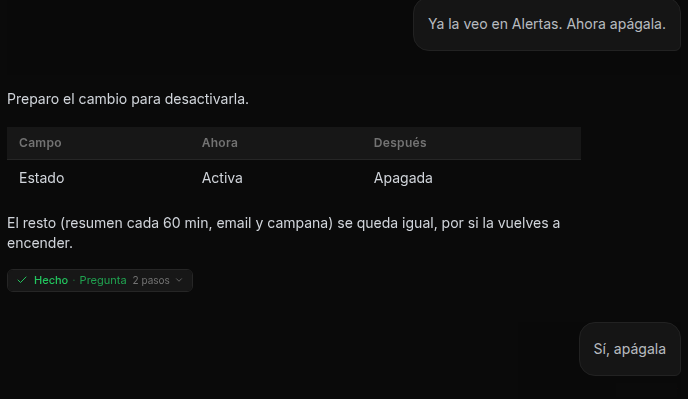
- Secrets never appear: a key is shown masked and only a variable’s name is visible.
- If what you ask can’t be done as is, it tells you in the preview and suggests what can be done, before changing anything.
- After doing it, it reads back what changed to check that it came out right.
What it does goes into the activity log under your name, marked as done via their assistant.
You can also give it these requests from Claude or from another application connected to NappAI. See From Claude and other applications.