

Chat Input
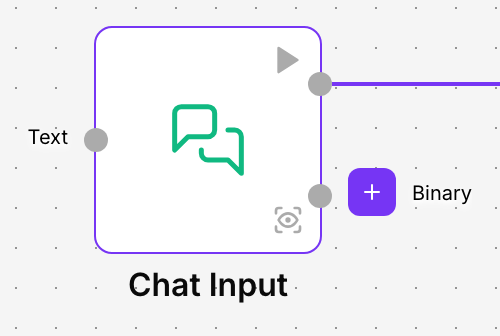
Chat Input is the entry point of flows that hold a conversation. It picks up the message a person types, for example in the playground chat or in a published assistant, and hands it to the next component, usually an agent. If the person attaches files, it passes those on too.
Use it whenever your flow has to answer what someone writes to it. It usually goes together with a Chat Output, which shows the answer in the same chat.
The playground chat
When a flow has a Chat Input, the playground opens in chat mode: you type in Send a message…, press Enter and the text reaches the flow through this component. The answer appears below, as in any chat, thanks to the Chat Output. See Test the flow in the playground.
Each conversation is saved with all its messages, and you can read it later in the Conversation Registry.
When to use it
- A customer service assistant that answers questions about orders, opening hours or returns.
- An internal assistant that answers your team’s questions from the company’s documentation.
- A chat where the person attaches an invoice or a photo and the flow analyses it.
- Trying an agent in the playground before you publish it.
Configuration
| Field | What it does |
|---|---|
| Text | The message that enters the flow. When the flow runs from a chat, it is filled with what the person types. You can type a fixed text here for testing or connect another component that provides it. |
Advanced options
| Field | What it does |
|---|---|
| Store Messages | Saves the message in the conversation history. Default: on. Turn it off if you don’t want the person’s messages to be recorded. |
| Sender Type | Says who the message belongs to in the history: User (the person) or Machine (the assistant). Default: User. |
| Sender Name | The name the sender is saved with. Default: User. |
| Session ID | Identifies the session the message belongs to. Leave it empty: the platform fills it with the session of the current conversation. The message is only saved in the history when there is a session. |
| Conversation ID | Identifies the conversation the message belongs to. Leave it empty so the platform uses the current conversation. |
| Files | Files sent along with the message: documents (for example text, PDF, Word or CSV), images, audio and video. Useful to test the flow with a fixed file; when the person attaches files in the chat, they arrive on their own. |
Output
- Message: the person’s message. Connect it to an agent’s User Prompt or to any component that works with text.
- Binary: the files that come with the message, both those loaded in Files and those the person attaches in the chat. Connect it to a component that reads or processes files, or to an agent that accepts files.
Example
The demo flow Asistente de soporte has three pieces: Chat Input → Agent → Chat Output.
- The customer writes in the chat: “When will my order 4512 arrive?”.
- Chat Input passes the question to the agent through its Message output.
- The agent checks its tools and writes the answer.
- Chat Output shows it in the chat and saves it in the conversation.
Good practices
- Leave Session ID and Conversation ID empty unless you know you need another value: that way each conversation is saved separately and the agent’s memory does not mix one person with another.
- Use a single Chat Input per flow, so it is clear where each message comes in.
Related components
- Chat Output: shows the answer in the chat.
- Text Input: for flows that receive a text, without a conversation.
- Agent: the component that usually answers the message.