

Outbound calls
A voice agent can also place calls. Any flow (scheduled, started by a webhook or by a form) can ask it to dial a number. When the person picks up, the agent speaks first and carries on the conversation like in any call.
It works for appointment reminders, order confirmations, surveys or notices.
You need:
- An outbound trunk: the connection with your phone carrier that calls go out through.
- The agent published with that trunk in Trunk for outbound calls.
- A flow with the Outbound Call component.
The outbound trunk is different from the inbound one, which only receives calls. See which trunk you need for what.
1. Create the outbound trunk
In the Voice Agent menu, Outbound trunks section, click New outbound trunk.
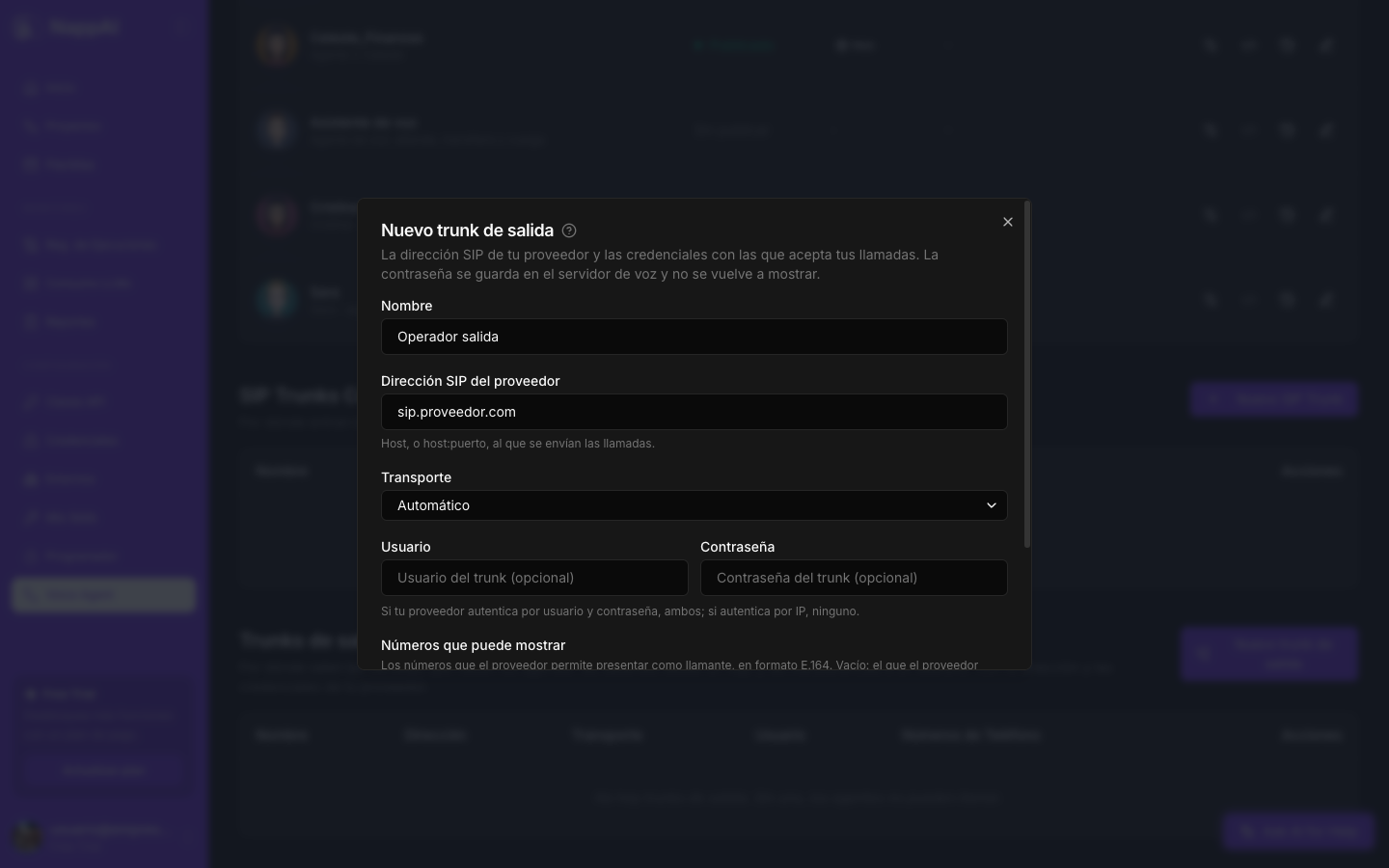
- Name: to recognize it.
- Carrier SIP address: the address the calls are sent to, for example
sip.carrier.com. It is in your carrier’s panel. - Transport: leave it on Automatic, unless your carrier tells you otherwise.
- Username and Password: the access details your carrier gives you for its trunk. If your carrier identifies your calls by IP address instead of username and password, leave both empty and ask NappAI support for the address you have to give it. The password is stored securely and never shown again.
- Numbers it may present: the numbers the carrier lets you show as the caller, in international format. Empty, the carrier uses whichever applies.
Click Create outbound trunk. Without an outbound trunk, agents cannot place calls or transfer to a phone.
2. Choose the trunk when publishing the agent
On the row of the agent that will call, click Configure consumption. In Trunk for outbound calls, choose the trunk. Automatic uses your only one. Then click Publish or Update publication.
The agent does not need to be published for the phone to place calls: being published is enough.
3. Call from a flow
In the flow that triggers the call, add the Outbound Call component from the Voice Agent family:
- Voice Agent: the agent that calls. Click the refresh button to see your agents.
- Destination: the number in international format, for example
+34600000000. - First message: what the agent says when the person picks up, word for word. Empty, it uses its greeting.
- Call context: what the agent needs to know about this call: who it is calling, why, and with what data.
- Wait for answer: on, the flow waits to know whether they answered. Off, it moves on as soon as the phone starts ringing.
- Advanced: Caller number (the number the called person sees) and Ring timeout (seconds) (how long it rings before counting as unanswered; 45 seconds by default).
Destination, First message and Call context accept tool mode. That way, an agent in the flow can decide whom to call and what to say.
The Call output carries the call’s result: status (answered if they answered, busy if the line was busy, no_answer if nobody picked up, failed if the call could not be placed, or dialing if the flow did not wait), answered (true or false), reason (the reason) and call_id, the identifier the call appears with in the history as Outbound.
Example: appointment reminder
- A Scheduler task, every day at 18:00, starts a flow that looks up tomorrow’s appointments.
- For each appointment, Outbound Call with:
- Voice Agent: “Appointment reminder”.
- Destination: the patient’s phone.
- Call context:
Patient Ana García, appointment tomorrow at 10:30 with Dr. Ruiz. Confirm or offer a change. - First message:
Hello, I'm calling from the clinic to confirm your appointment tomorrow. Does half past ten suit you?
- If
answeredis false, send a WhatsApp message with the same information.
Best practices
- Explain in the prompt that it may be the one calling. A prompt that only talks about answering calls fits an outbound call less well.
- A voicemail counts as answered. Ask in the prompt to say goodbye and hang up if nobody responds after the first message.
- For large campaigns, turn off Wait for answer and check the results in the history. With waiting on, the flow does not move on until it knows each call’s result.
- Follow the regulations. Calling hours, consent and do-not-call lists are the responsibility of the flow that triggers the calls.