

OpenAI Decisions
OpenAI Decisions is OpenAI’s decision model. It works like Laya and Jev: it answers a question you define and always returns one of the answers you planned for, with how sure it is of each one. Each possible answer is an output of the node, and the text carries on only through the chosen one.
What sets it apart is that it also looks at images: a photo, a scanned document or a screenshot, alone or next to a text. The text and the images are sent to OpenAI, and each decision is charged to your OpenAI account with the same credential you use for its models.
When to use it
- Telling whether the photo a customer sends shows a damaged product.
- Telling whether a scanned document is an invoice, a delivery note or a contract.
- Rating how serious an incident is from the screenshot and the message that comes with it.
- Classifying emails or tickets when you already work with OpenAI and would rather not sign up for another service.
Configuration
| Field | What it does |
|---|---|
| Credential (required) | The OpenAI API credential. Pick one in Select a credential or create one with Create new credential, with your OpenAI account’s key. More in Credentials. |
| Text | The text to decide about. Connect it from another component or write it. Required unless you connect images. In Batch Mode, switch to Mapped and drag the item field that holds the text. |
| Images | The images to decide about, alone or with the text. For the photos people send in the chat, connect the Binary output of Chat Input; it also takes files and data holding the image. When a message arrives without a photo, the decision is made on the text alone. Takes PNG, JPEG, WEBP and GIF; other formats are converted. Up to 128 images per decision. |
| Decision | The kind of decision: Pick one (choose one answer), Pick several (every one that applies), Yes or no or Scale (a level on a scale). Default: Pick one. The node’s fields and outputs change with your choice. |
| Question (required) | What to decide, in plain words and in the language of the texts. For example: “What does the photo show?”. |
| Answers (required with Pick one and Pick several) | One row per answer: its name and when to choose it. The description is what the model compares the text and images with. You need at least two answers and at most 50. |
| Levels (required with Scale) | The levels of the scale, lowest first; for example low, medium, high. Between 2 and 10 levels, with no repeated names. |
Advanced options
| Field | What it does |
|---|---|
| Minimum confidence | A value between 0 and 1. When the answer is less sure than this, the text does not leave through that answer but through an extra Unsure output, so a person can review it. 0 (the default) turns it off. |
| Model | The OpenAI model that decides. Default: gpt-6-luna, the only one the Decisions API takes today. |
Batch processing
With the Batch Mode switch on, the component runs once for each item of the list you connect to Batch Input and returns all the results together in a list. Parallel Executions sets how many items run at once (1 to 5). Skip if Empty Batch Input skips the component when the list arrives empty, and Skip Branch if Empty Output stops the following components when the result is empty. More in Key concepts.
The question and answers are the same for every item, and each item leaves through its own answer.
As an agent’s tool
You can connect this component to an agent’s Tools input. In the Tool tab, Tool Name and Tool Description are the name and explanation the agent uses to recognise the tool and decide when to use it: write a clear description of what it does.
Left empty, they are built from your question and its answers. The agent writes the text to decide about itself and gets the whole decision back. While the node is connected as a tool, the answer outputs are hidden.
Output
The outputs are the same as in Laya and Jev:
- One output per answer (Pick one), per answer plus None of them (Pick several), Yes and No (Yes or no) or one per level (Scale). With a value in Minimum confidence, Unsure appears too. Only the chosen output carries the text (with Pick several, every one that applies).
- Decision: the text and its decision as data: the question, the kind of decision, the chosen answer (
answer), how sure it is (confidence), the probability of each answer (probabilities) and whether it fell below the minimum confidence (unsure).
Example
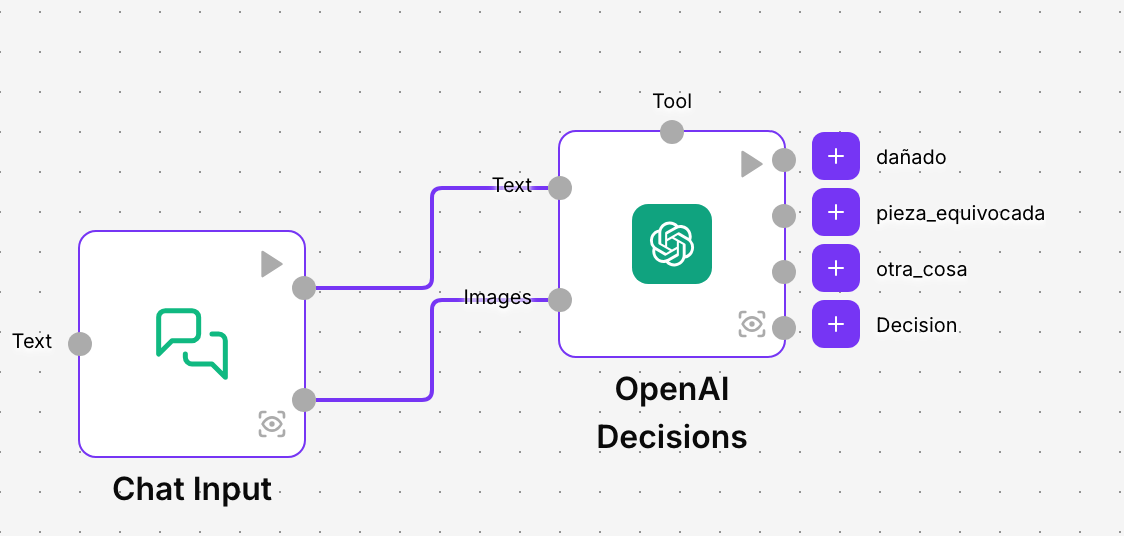
The online shop Alameda Furniture receives photos in the chat of orders that arrive damaged. With OpenAI Decisions:
- Connect the Message output of Chat Input to Text and its Binary output to Images, and pick the OpenAI API credential.
- Leave Decision on Pick one and write in Question: “What does the photo show?”.
- In Answers add damaged (a broken or scratched piece of furniture, or a crushed box), wrong_item (furniture or a part that does not match the order) and something_else (any other image).
- Connect damaged to opening a return, wrong_item to the logistics team and something_else to an agent that asks the customer for a better photo.
Good practice
- Describe each answer well and write them in the language of the texts.
- Add an answer for what does not fit, such as something_else, so an unexpected image is not forced into a wrong answer.
- One decision per node. For two questions about the same input, use two nodes.
Related components
- Laya: NappAI’s own decision model, with no credential and without sending the text anywhere.
- Jev: the same kind of decision with TypeSafe AI’s service, for long texts.
- Describe Image: describes an image in words instead of deciding about it.