

Chapter 1: Goal and components
In this use case you’ll build a personal assistant that answers questions about your email and your calendar. You’ll be able to write things like What meetings do I have on Monday 12 October? or Summarise the last emails I’ve received, and the assistant will check Gmail or Google Calendar to answer you.
How it works
The heart of the flow is an Agent: a component that reads your request, decides which tool it needs and writes the answer. For it to do that you’ll give it:
- A language model, which is what understands and writes the text.
- Two tools: one to read emails and another to check the calendar.
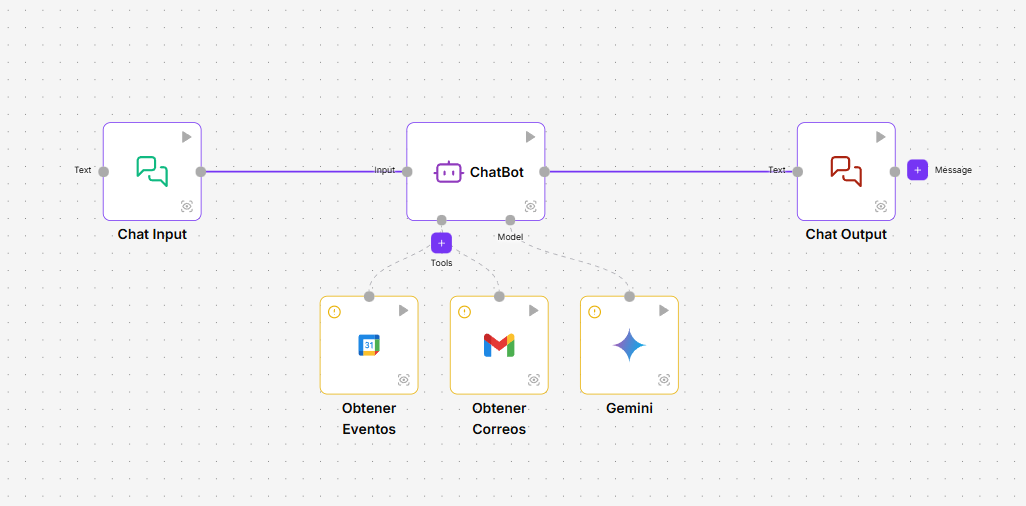
The components
| Component | What you’ll use it for |
|---|---|
| Chat Input | Receives what you type in the playground. |
| Agent | Understands the request, uses the tools and writes the answer. |
| Gemini | The agent’s language model. You can use another provider, such as OpenAI or Anthropic, if you have its credential. |
| Gmail Message | The tool that reads your emails. |
| Calendar Event | The tool that checks your calendar’s events. |
| Chat Output | Shows the agent’s answer. |
What you need
- A Google account with Gmail and Google Calendar.
- A Gemini API key, which you get in Google AI Studio.
- A role that lets you create flows and credentials. See Roles and permissions.
In the next chapter you’ll create the credentials.