

Chapter 3: Flow Construction and Configuration
With the credentials ready, it is time to assemble our assistant.
1. Add and Connect the Components
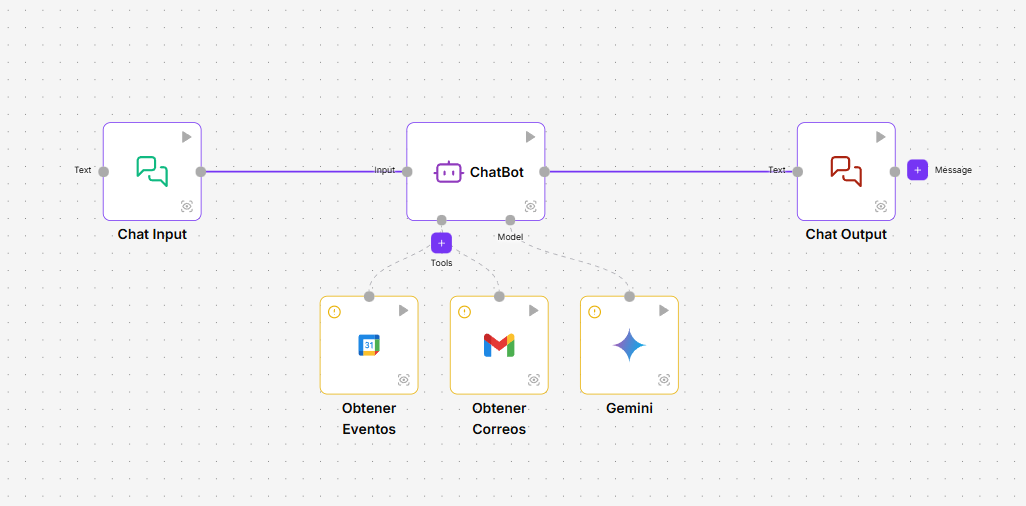
Open a new project and drag the six components we listed in Chapter 1 onto the canvas. Then, connect them following these precise instructions:
- Input Connection: Connect the
messageoutput of Chat Input to theinputinput of ChatBot (Agent). - Output Connection: Connect the
responseoutput of the ChatBot to theinputinput of Chat Output. - Brain Connection (LLM): Connect the
modeloutput of the Gemini model to thellminput of the ChatBot. - Tools Connection:
-Connect the
tooloutput of Get Mails to thetoolsinput of the ChatBot. -Connect thetooloutput of Get Events to thetoolsinput of the ChatBot.
2. Field-by-Field Configuration
Now, let’s configure each component by clicking on it. Follow the instructions for each field you see on the screen.
Configure Get Mails (Gmail)
- Credential: Select the credential you created:
Mi Credencial de Gmail. - Leave the other fields at their default values for now.
Configure Get Events (Google Calendar)
- Credential: Select the credential you created:
Mi Credencial de Calendar. - Leave the other fields at their default values for now.
Configure Gemini
- Credential: Select your credential:
Mi Credencial de Gemini. - Model: Ensure a model is selected, for example,
gemini-2.5-flash.
Configure ChatBot (Agent)
This is the most important step, as it defines the assistant’s behavior.
- System Prompt: Paste the following instructions into the corresponding field.
You are a conversational assistant designed to help users manage their email and calendar. You use Gmail tools to read messages, and Google Calendar tools to review and create events. Your goal is to provide direct and accurate answers.
INSTRUCTIONS FOR HANDLING DATE FORMAT: All dates and times must use the ISO 8601 standard. For full-day events: YYYY-MM-DD. For timed events: YYYY-MM-DDTHH:MM:SS.
3. Test Your Assistant!
Your flow is ready! Go to the Test Environment, type a request like “what events do I have next Monday” and observe how the agent thinks, selects the Calendar tool, and gives you the answer.
You have built a functional AI agent that integrates multiple services. Congratulations!